

The Context7 Admin MCP server is a remote MCP server that lets an agent manage your Context7 account: teamspace members, libraries, rules and policies, usage, Docs7 sites and Ask sites.
For documentation lookup, use the Context7 MCP server (https://mcp.context7.com/mcp) instead.
Connect#
Server URL: https://admin.mcp.context7.com/mcp
Authentication#
OAuth#
Clients that support MCP OAuth ask you to sign in with your Context7 account on the first request, and sign in again when the token expires.
API key#
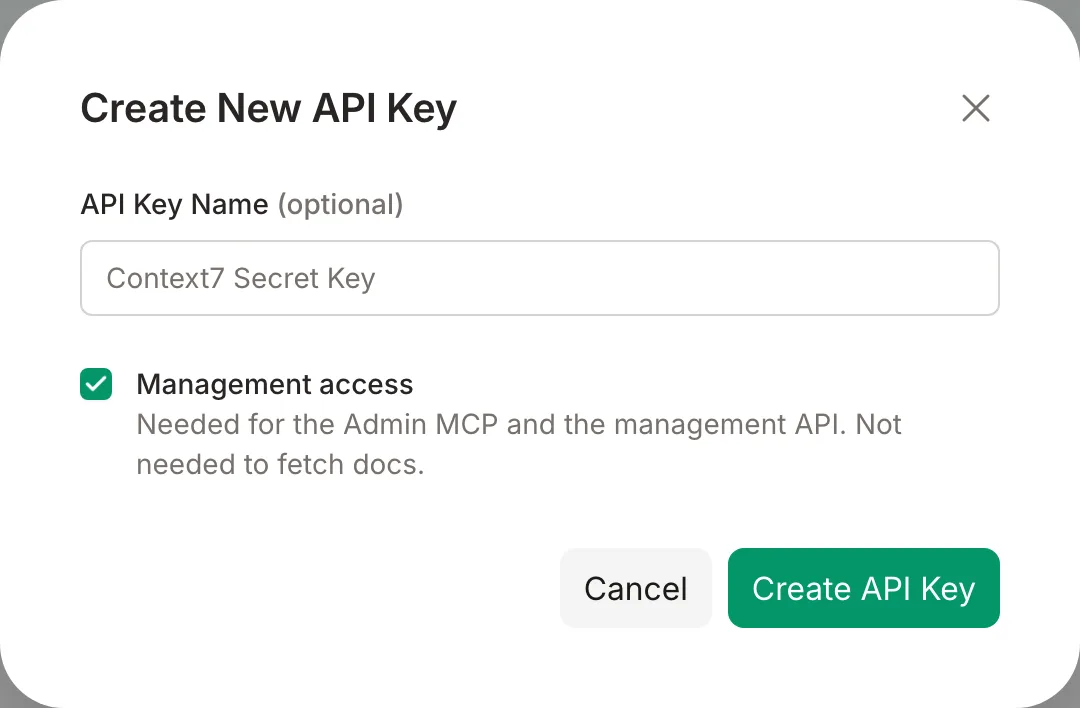
Create a Context7 API key in the dashboard with Management access ticked, and send it as a bearer token. A key without it gets 403 management_access_required, and a key reaches only its own teamspace. See Management access.
Teamspaces#
One OAuth connection reaches every teamspace you are a member of, with your role in each.
- Each tool takes
teamspace: an id or a name. Leave it out when you have one teamspace. With several, the error lists them, and you can pass a differentteamspaceon each call to work on more than one in a session. - Docs7 and Ask sites belong to a teamspace.
docs7_list_sitesandask_list_sitesgive their ids; every site tool takessite_id(Docs7) orsite_key(Ask). - An API key belongs to one teamspace. Use one key (and one server entry) per teamspace.
- To limit what an agent can do (read only, some tools only), use your client’s tool settings: Claude connectors and Claude Code permissions can turn each tool off or make it ask first.
Tools#
- Library ids take
/owner/repo,owner/repo, or acontext7.comlibrary URL. - Long jobs (library parse, Docs7 build, Ask crawl): call
get_library,docs7_get_deploymentorask_get_sitewithwait: true. The server waits up to about 25 seconds for a final state. - The Docs7 agents run on their schedules, which
docs7_update_sitesets. This server reads their runs and does not start them.
| Group | Tools |
|---|---|
| account | list_teamspaces, open_console, get_teamspace, manage_members |
| libraries | list_libraries, get_library, add_library, refresh_library, update_library_config, manage_library_versions, claim_library, remove_library, get_library_analytics, get_library_suggestions, get_library_benchmarks, manage_owned_library |
| rules | manage_rules, get_library_policies, update_library_policies, manage_library_requests |
| usage | get_teamspace_usage, set_spending_limit |
| docs7 | docs7_list_sites, docs7_get_site, docs7_create_site, docs7_update_site, docs7_check_domain, docs7_list_deployments, docs7_get_deployment, docs7_deploy, docs7_remove_preview, docs7_get_agent_runs, docs7_list_pull_requests, docs7_connect_repository, docs7_manage_example_check, docs7_manage_feature_requests, docs7_get_analytics, docs7_query_logs, docs7_get_conversation |
| ask | ask_list_sites, ask_get_site, ask_create_site, ask_verify_site, ask_get_analytics, ask_list_questions |
list_libraries and docs7_list_sites return 50 items per page with total, page and pages. list_libraries also takes search (part of a library’s id, title or source URL) and order: "lowest" (lowest benchmark score first); docs7_list_sites takes search (part of a site’s name, repository, address or library id). A page past the last one is an error.
Console#
In clients that support MCP Apps (Claude, ChatGPT, VS Code, Cursor), open_console shows a summary card in the chat — a teamspace’s usage and spend, libraries and benchmark scores, Docs7 sites, or Ask sites — with an Open console action that expands it to the full console. view picks the card (usage, libraries, docs7 or ask; default usage) and teamspace takes an id or name. In other clients open_console returns the teamspace list as text.
The page reads through this server’s read tools, called for it by the client with your sign-in, so it holds no credential of its own. Write and destructive tools are hidden from it, and requests that need the model (“Fix the lowest”, “Find doc gaps”) are sent to the chat as your next message.
Management API#
The same operations are available over the REST API at /api/v2/teamspaces/{teamspaceId}, so a script can use them without an MCP client. It takes the same credentials as this server: an API key with Management access, which reaches only its own teamspace, or an OAuth token issued for this server. See the API reference for the routes.
Safety and limits#
- Remove and delete actions (
remove_library,manage_membersremove,manage_library_versionsremove,manage_rulesdelete,manage_owned_libraryblockandtransfer,docs7_manage_feature_requestsdelete,docs7_remove_preview) are marked destructive, so your client asks you before it runs them. They also takeconfirm, set to the exact target — the library id, email, version, rule id, request id or branch. - Deleting a whole Docs7 site or Ask site cannot be undone, so it is not in this server. Do it in the dashboard.
- Results that hold third-party text (questions, searches, feedback, build logs, agent runs, library suggestions and benchmark questions) are fenced in
<untrusted-data-…>tags. - Results above about 20,000 tokens are cut, with a note on how to narrow the request.
Billing, plans, API keys, SSO and teamspace create or delete are not in this server. Use the dashboard.