

Best Docs Platform for AI Agents and LLMs: 7 Live Sites Tested (2026)
 Abdullah Enes Gules12 min read
A coding agent that needs your quickstart fetches one URL. On some docs sites it gets a 5 KB Markdown file. On others it gets 900 KB of HTML, or a 404 page with nothing to follow.
We ran the same checks with curl against seven live docs sites on November 2, 2026: Mintlify, GitBook, Fern, ReadMe, Docusaurus, Starlight, and Docs7, which is ours. Each site is the platform's own documentation, so each one shows the platform at its best. Mintlify, GitBook, Fern, ReadMe and Docs7 pass the basic checks. The official Docusaurus and Starlight sites fail them, because those tools need plugins for agent formats. The platforms differ in what comes after the first fetch: MCP servers, 404 pages, and whether the docs reach the tools where agents look things up.
What makes docs agent-ready?
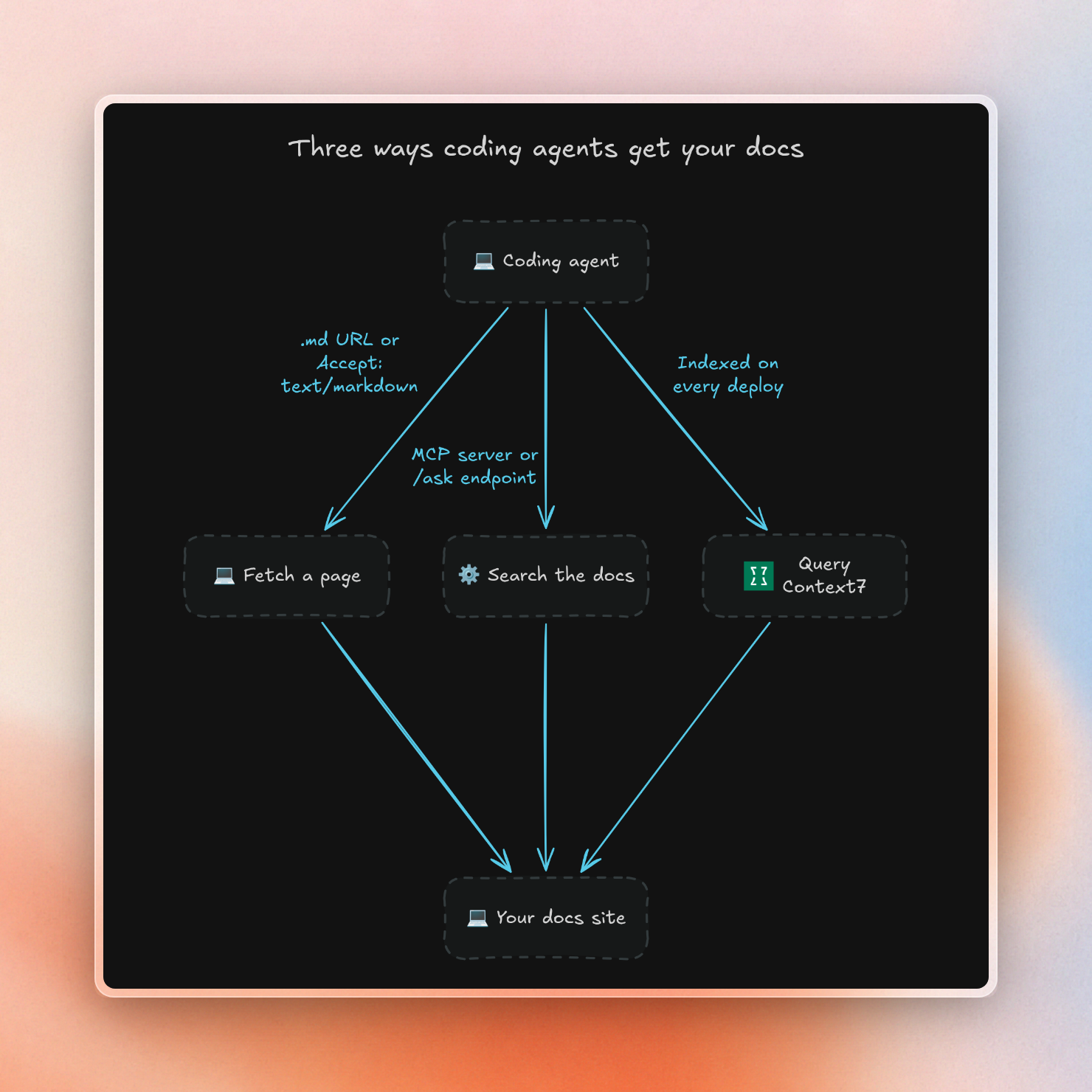
Agent-ready documentation is any documentation that an AI agent can find, access and search using HTTP only, without a browser. That means the site returns Markdown pages, is indexable with llms.txt, can be accessed by AI crawlers and can be searched with tools or indexed for agents to find.
These are the things you can test:
- Markdown per page. You can add
.mdto a page URL and get a Markdown-format response with atext/markdowncontent type. This means any page on the documentation site can be accessed directly in a format agents like. - Content negotiation. If you request the normal page URL with an
Accept: text/markdownheader, the site will return Markdown instead of HTML. If an agent does not try adding.mdto URLs, it still gets the small version. llms.txtandllms-full.txt. At the docs root, there is an index of pages and a single file containing all of the documentation. This follows the format described in our guide to platforms that generate llms.txt.- Server-rendered HTML. The text of the page is present in the HTML sent from the server. This is important for crawlers that do not execute JavaScript.
- AI crawler access. GPTBot, ClaudeBot and PerplexityBot are not blocked in
robots.txtand the page returns a 200 response to them. - A search tool for agents. Agents can use an MCP server or a search URL to ask questions of the documentation, rather than just reading pages.
- Indexed on Context7. Agents can access the documentation using the Context7 MCP server without even visiting the site.
Results: seven docs sites, seven checks
We pointed one script at each platform's own docs site and one getting-started page on it. The script asks for each agent format and prints the status code and content type that came back:
$ #!/usr/bin/env bash
$ # usage: ./agent-ready.sh DOCS_ROOT PAGE_URL
$ root=$1; page=$2
$ code() { curl -sL -o /dev/null -w '%{http_code} %{content_type}' "$@"; }
$ echo "llms.txt        $(code "$root/llms.txt")"
$ echo "llms-full.txt   $(code "$root/llms-full.txt")"
$ echo "page.md         $(code "$page.md")"
$ echo "Accept md       $(code -H 'Accept: text/markdown' "$page")"
$ echo "GPTBot          $(code -A 'GPTBot/1.2' "$page")"
$ echo "HTML bytes      $(curl -sL "$page" | wc -c)"
$ echo "Markdown bytes  $(curl -sL "$page.md" | wc -c)"
This is the run against the Upstash docs, which Docs7 builds and hosts:
$ ./agent-ready.sh https://upstash.com/docs https://upstash.com/docs/redis/overall/getstartedllms.txt 200 text/plain
llms-full.txt 200 text/plain
page.md 200 text/markdown; charset=utf-8
Accept md 200 text/markdown; charset=utf-8
GPTBot 200 text/html
HTML bytes 281411
Markdown bytes 4973We added three more probes for the other checks. An MCP initialize call followed by tools/list tested the MCP server. A text search on the raw HTML, with scripts removed, tested server rendering. A search on the Context7 API tested the index. All seven sites, on November 2, 2026:
All four of the hosted alternatives we used and Docs7 fulfill the per-page checks. On the other hand, Docusaurus and Starlight require the use of community plugins to do the same, which we provide instructions on in our llms.txt guide, but do not have implemented on their own sites. Note that Fern intentionally doesn't offer llms-full.txt, and instead requests agents fetch per-page as full-site size exceeded most context windows.
Markdown pages cost 37 to 98 times fewer tokens
An agent pays for every token it reads, and the context window has a hard limit. So we fetched the same quickstart pages again and counted tokens with the o200k tokenizer that GPT-4o and later OpenAI models use:
import { countTokens } from "gpt-tokenizer"; // o200k_base

const pages = {
  Mintlify: "https://www.mintlify.com/docs/quickstart",
  GitBook: "https://gitbook.com/docs/getting-started/quickstart",
  Fern: "https://buildwithfern.com/learn/sdks/current/overview/quickstart",
  ReadMe: "https://docs.readme.com/main/docs/quickstart",
  Docs7: "https://upstash.com/docs/redis/overall/getstarted",
};

for (const [name, url] of Object.entries(pages)) {
  const html = await (await fetch(url, { headers: { Accept: "text/html" } })).text();
  const md = await (await fetch(`${url}.md`)).text();
  const h = countTokens(html);
  const m = countTokens(md);
  console.log(`${name.padEnd(9)} HTML ${h.toLocaleString().padStart(7)} tokens  Markdown ${m.toLocaleString().padStart(6)} tokens  ${Math.round(h / m)}x`);
}
Mintlify HTML 101,107 tokens Markdown 2,725 tokens 37x
GitBook HTML 345,844 tokens Markdown 5,226 tokens 66x
Fern HTML 86,798 tokens Markdown 1,077 tokens 81x
ReadMe HTML 126,118 tokens Markdown 1,289 tokens 98x
Docs7 HTML 99,385 tokens Markdown 1,186 tokens 84x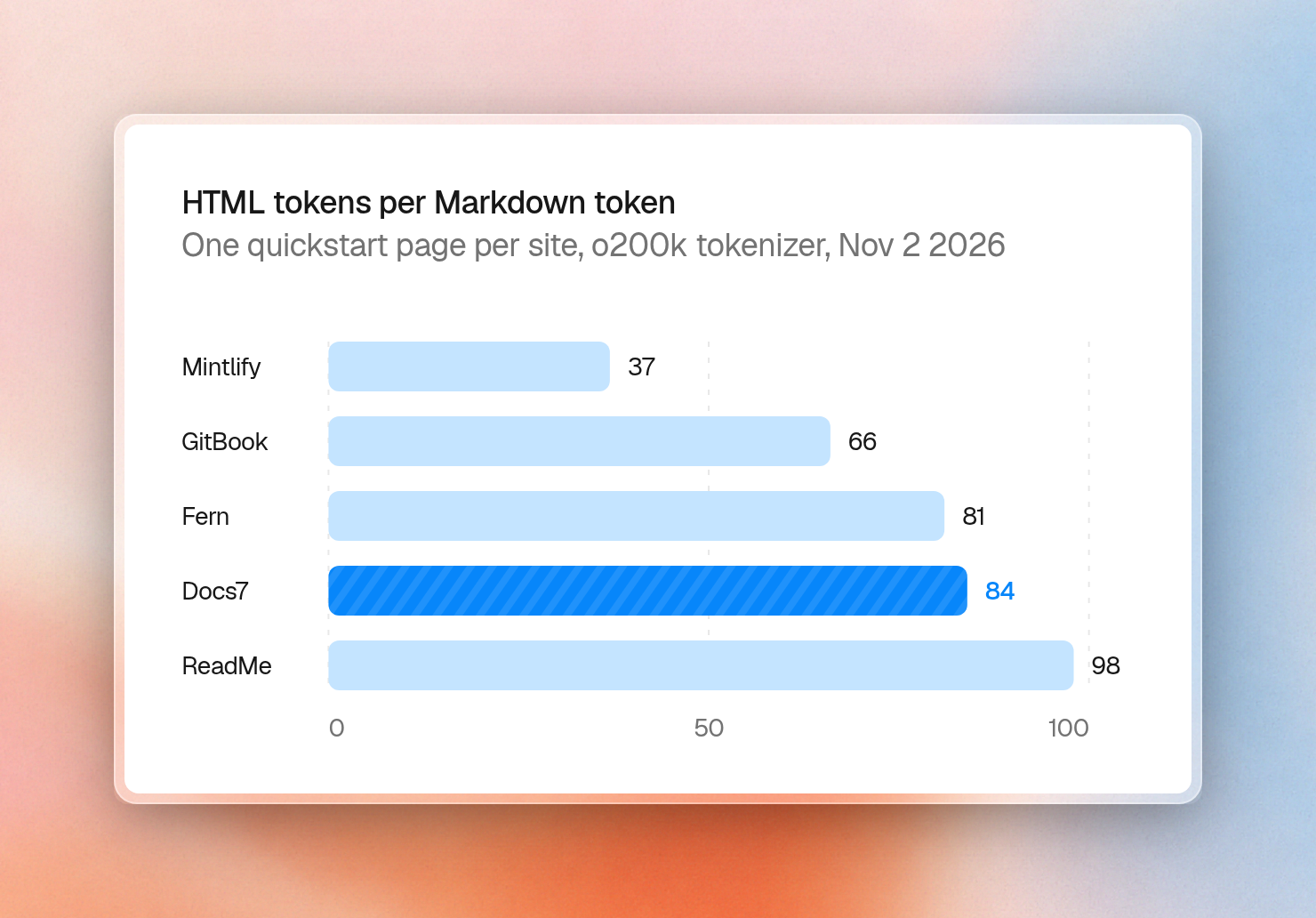
A single GitBook quickstart page represented as raw HTML is 345,844 tokens - it wouldn’t fit into a 200,000 token context window. The Markdown representation of the same page is 5,226 tokens. The ratio depends on the page as much as the platform: Mintlify's quickstart Markdown carries setup steps written only for agents.
What happens when an agent guesses a URL
Agents guess URLs. They build a path from a page title, drop a segment, or reuse a link from an older version of the docs. So we asked each site for its quickstart with one letter missing, as an agent would after a typo, and read what came back:
Here is the full Docs7 response for /redis/overall/getstartd.md:
# Page Not Found

`/redis/overall/getstartd` does not exist. Similar pages:

- [Getting Started](/docs/redis/overall/getstarted.md): Create an Upstash Redis database in seconds
- [Get Started](/docs/redis/sdks/ts/getstarted.md): Install @upstash/redis, connect to your Upstash Redis database over HTTP, and run your first commands from TypeScript or JavaScript.
- [Compare](/docs/redis/overall/compare.md): How Upstash Redis compares to AWS ElastiCache, AWS MemoryDB, Redis Labs, AWS DynamoDB and FaunaDB, and what makes Upstash different.
- [Prod Pack & Enterprise](/docs/redis/overall/enterprise.md): Upstash has Prod Pack and Enterprise plans for customers with critical production workloads.
- [Compatibility](/docs/redis/overall/compatibility.md): Upstash supports both native Redis TCP and HTTPS REST. Upstash supports Redis client protocol up to version 8.4.

All pages: [/docs/llms.txt](/docs/llms.txt). Full text: [/docs/llms-full.txt](/docs/llms-full.txt)
When an agent asks for a missing page, Mintlify, ReadMe and Docs7 return a 404 with a useful body. GitBook and Fern return a 200, which means that any check on the status code will be incorrect, and that crawlers might store the "not found" text as a real page.
Docs7 also builds suggestions on every site with no setup. The first one is the page the agent wanted, so a wrong guess costs one more request instead of a dead end.
MCP servers, ask endpoints and Context7
Reading pages one by one is slow for an agent with a specific question. A search tool lets it ask first and read only the page that answers. We sent an MCP initialize request and a tools/list request to each documented MCP address, and these are the tools that came back:
ReadMe offers the most functionality since its server can also read the OpenAPI spec and make calls to the API endpoints. This is a very useful feature for an API product since an agent can both read about an endpoint and try it using the same connection.
Docs7 does not host an MCP server for each docs site. It gives agents two ways in. The first is an ask endpoint on every site that any agent can call with a plain GET request:
$ curl 'https://upstash.com/docs/ask?q=ratelimit'{
"results": [
{
"href": "/docs/redis/sdks/ratelimit-ts/gettingstarted#install-ratelimit",
"title": "Getting Started",
"heading": "Install Ratelimit",
"snippet": "First, we need to install @upstash/ratelimit",
"tab": "Rate Limit"
},
{
"href": "/docs/redis/sdks/ratelimit-ts/algorithms#usage",
"title": "Ratelimiting Algorithms",
"heading": "Usage",
"snippet": "Create a new ratelimiter, that allows 10 requests per 10 seconds",
"tab": "Rate Limit"
}
]
}Context7 is the other approach. All seven tested sites are on Context7. When we checked the Context7 API on November 2, the Upstash docs on Docs7 had been refreshed the same day. ReadMe docs on Context7 were last refreshed on July 17, 2026, and Fern docs on October 6.
A per-site MCP server requires every user to add your server to their agent. Context7 has served over 100 million agent requests, and is already installed in many agents.
Context7 adds new docs when somebody submits them, but with Add to Context7 on Docs7, Context7 updates its library for the site with every successful production build.
With Docs7 and Add to Context7, any user can access the docs for your product in their agent with query-docs if they already use the Context7 MCP server with Claude Code, Cursor or Codex, without installing anything specific to your product.
With Docs7, agents can also search your docs with a read-only ask_docs tool on the page in browsers with WebMCP support. No per-agent setup is required, since Docs7 notifies agents of the existence of the URL in HTML and Markdown at the top of every page.
Crawler access and server-rendered HTML
None of the sites blocked AI crawlers in their robots.txt file, and for all seven sites the content was in the HTML before the JavaScript, meaning that non-JS crawlers still get the content.
Several sites additionally used robots.txt content signals to opt-in to AI usage: Docs7 generates a robots.txt that specifies Content-Signal: ai-train=yes, search=yes, ai-input=yes. ReadMe allows projects to set these three signals independently, and GitBook’s own site allows search and AI answers, but specifies ai-train=no. When hosted as a sub-path on a parent site like example.com/docs, the parent site’s robots.txt will be used by the crawlers, and on Docs7 it can be overridden by placing a file in the root of the docs.
All seven sites passed the basic crawler check, serving 200 responses to the GPTBot, ClaudeBot and PerplexityBot user agents.
The user agent test showed one real difference. Mintlify and GitBook look at who is asking and send Markdown to AI agents even when the agent does not ask for it:
Mintlify and GitBook do better on this. Fern, ReadMe and Docs7 return the full HTML if agents don’t ask for Markdown, though their responses always include Link headers to the .md version of the page (Docs7 includes links to llms.txt, llms-full.txt and an Agent Skills index in those headers, too). Agents that read response headers can pivot and request Markdown next, but if they read only the response body, they’ll get full HTML.
Price of the agent features
Every hosted platform in the test puts Markdown pages and llms.txt on its free plan. Mintlify, GitBook, Fern and ReadMe also give free sites a hosted MCP server. The plans split on AI analytics, the chat assistant and the writing agents. Prices as listed on each pricing page on November 2, 2026:
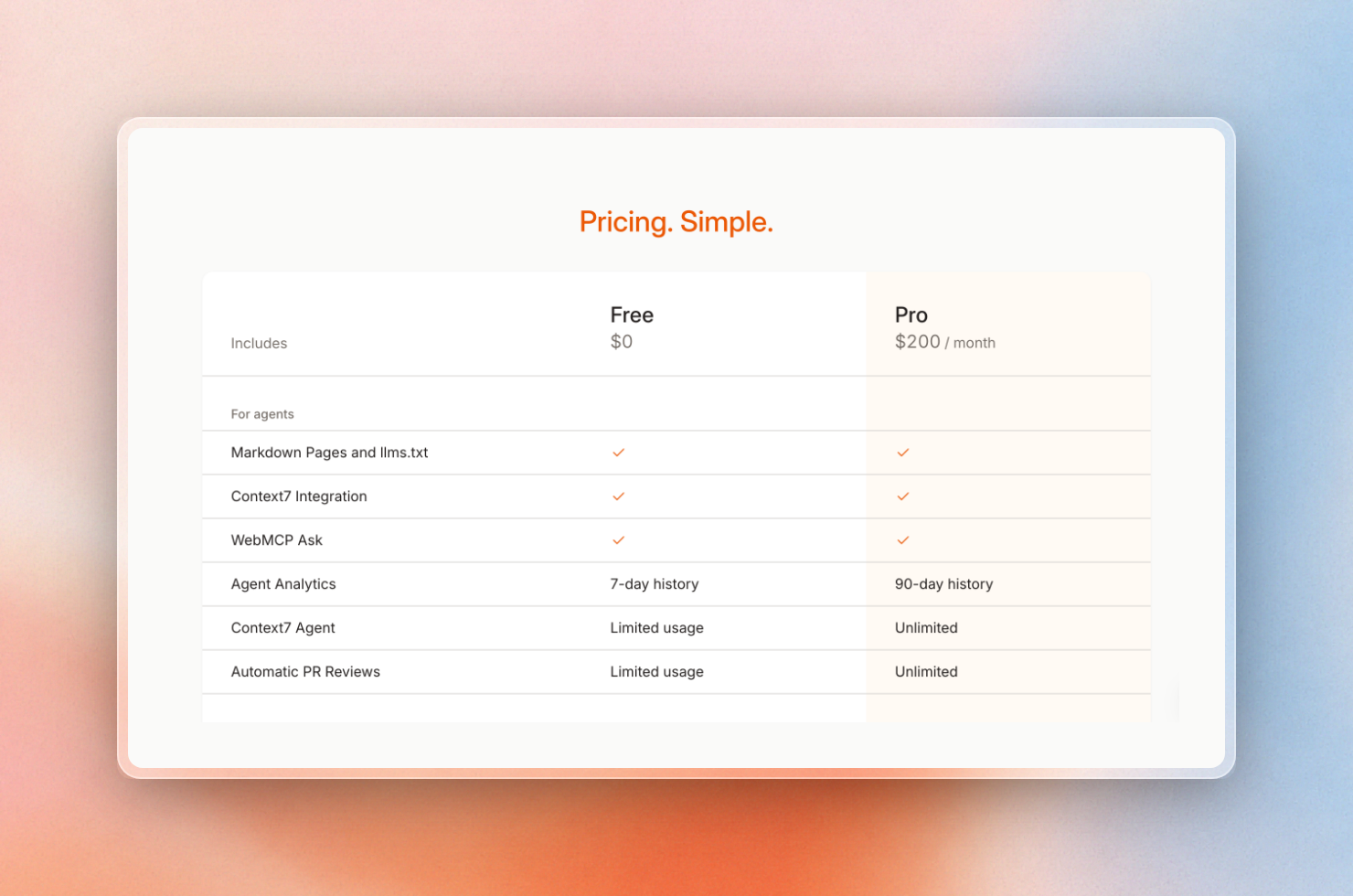 Docs7 Free and Pro, agent features
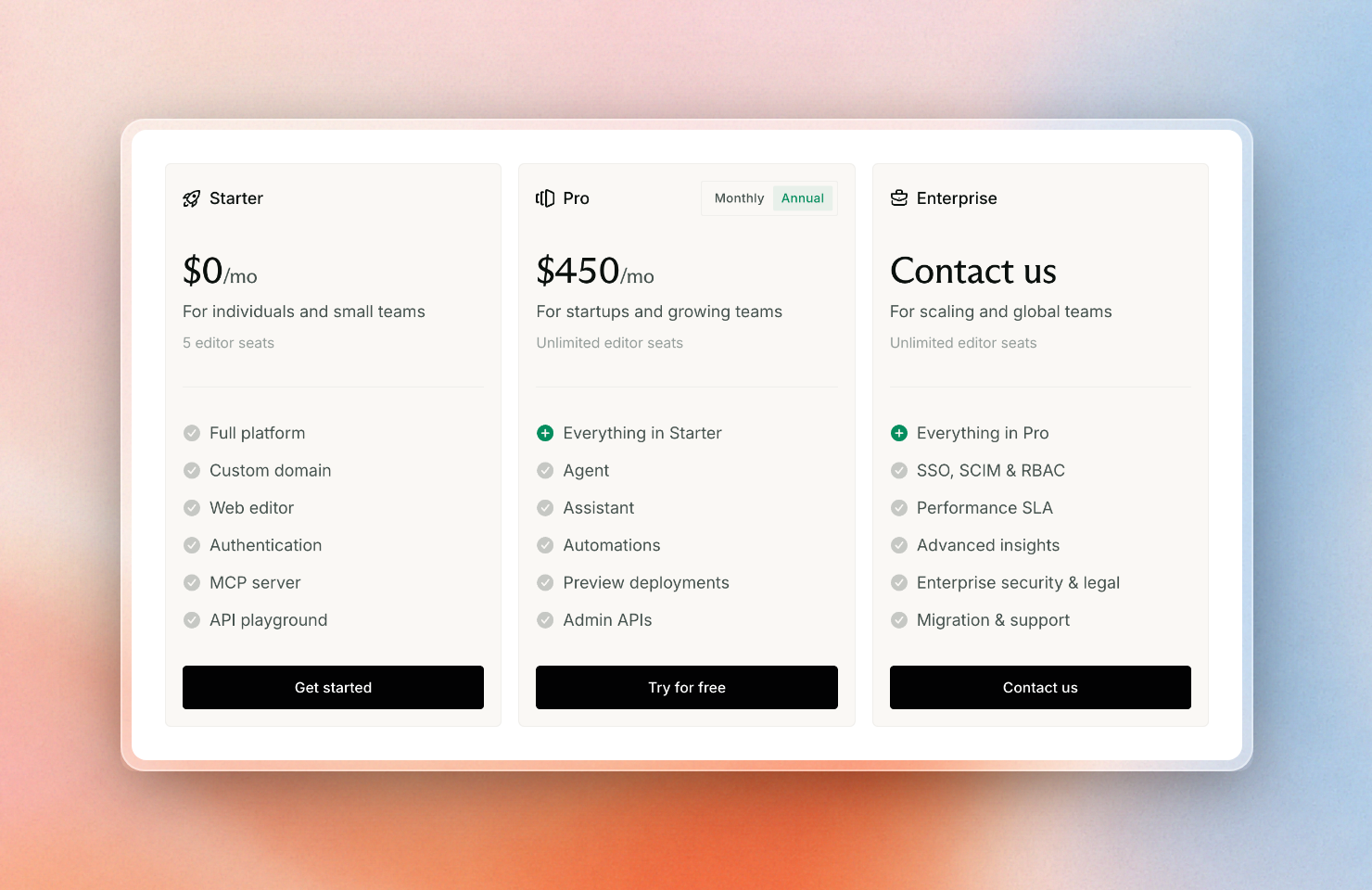 Mintlify plans with annual billing, November 2, 2026
Which docs platform is best for AI agents and LLMs?
The best docs platform for AI agents depends on how agents reach your docs. Mintlify and GitBook send Markdown to agents without being asked, ReadMe has the strongest MCP server for API products, and Docs7 refreshes your docs on Context7 on every deploy and answers mistyped URLs with the right page.
- Docs7 is for developer-focused companies that want users' AI agents to discover their docs in the tools they are already using. It auto-updates docs on Context7 on every deploy, suggests the correct page for misspelled URLs, and offers insights on which AI agents are accessing which pages and what they are asking for on its free plan. It natively builds Mintlify
docs.jsonprojects, but does not support hosting an MCP server for each docs site or any web editor. - Mintlify is for companies that want to serve Markdown to agents based on user agent (without the agent needing to request it), and to host an MCP server on any plan. Its agent analytics require its $450/month Pro plan.
- GitBook is for companies whose non-technical users use its web editor to update docs. It also supports serving Markdown to AI agents based on user agent, but its 404 pages return a 200 HTTP response.
- ReadMe has the most complete MCP server implementation for an API company, because it lets agents search for API endpoints and make requests within the same server.
- Fern is for API companies that also want to auto-generate SDKs for the same API, and exposes an MCP server on its free plan.
- Docusaurus or Starlight are for open-source companies that want complete control over their docs without any ongoing cost. However, they rely on community plugins for any AI features.
These docs platforms are the ones that meet basic criteria such as supporting Markdown pages, serving Markdown content based on content negotiation, exposing a llms.txt, SSRing pages to expose the full page HTML to agents, and not blocking crawlers by default:
- Mintlify
- GitBook
- Fern
- ReadMe
- Docs7
If you already use one of these platforms and your site meets the checks above, there's no reason to switch platforms for agent formats. Use whatever you prefer. You can also submit your llms.txt to Context7 to keep the docs updated for agents accessing docs through Context7, even if it's not a platform we have listed, or link the repo with Docs7 to keep the docs on Context7 updated on every deploy. Check out AI agents that keep your docs up to date for an example of a Docs7 agent that turns unanswered agent questions into PRs.