

How to Write SDK Documentation: Tools for Reference Docs, Versions, and AI Agents
 Abdullah Enes Gules12 min read
Now that you’ve got a working SDK and an installation instruction in your README, users are probably going to ask questions that are not answered by the README.
Your SDK’s documentation is broken down into two distinct parts that each require different tools to create.
The reference documentation, which lists all the classes, methods, and parameters in your SDK, should be automatically generated from the comments in your code. On the other hand, the guides such as quickstart, authentication, common tasks, and migration notes require more human touch.
Once you have both reference and guides, you’ll need a place where both live together, show how to make the same call in every language your SDK supports, support versioning of your documentation for each release, and also serve the documentation to coding agents like Claude Code, Cursor, and Codex that read your docs to write code with your product.
What should I use to write docs for my SDK?
Host both on a docs platform that has code tabs, per-release versions, and Markdown output for AI agents. The quickstart and guides should be written manually, in Markdown or MDX, in the SDK repo. The API reference should be generated automatically from the code comments using your language's reference generator.
Each part of SDK docs has a tool that does it well:
The quickstart is the guide that a new user is going to copy line by line, so if it's missing something they are out of the game right away. The best way to make sure it works is to go through the quickstart yourself in an empty project before each release.
Generate the API reference from your code
Every common SDK language has a generator that reads doc comments and writes the reference. Some languages also have a public site that builds and hosts it each time you publish a package:
Your docs site can just link to docs.rs or pkg.go.dev and devote its own pages to guides. With Rust and Go, it’s enough to just publish the package.
For TypeScript, the Markdown plugin puts the reference in the same site as the guides, with the same search and the same agent formats. This config writes one MDX page per module, so links between types become anchors on that page:
{
  "entryPoints": ["src/index.ts"],
  "plugin": ["typedoc-plugin-markdown"],
  "out": "docs/reference",
  "fileExtension": ".mdx",
  "entryFileName": "sdk",
  "outputFileStrategy": "modules",
  "hideBreadcrumbs": true,
  "hidePageHeader": true,
  "readme": "none"
}
TypeDoc reads the comments in the source:
/**
 * Options for creating a {@link Client}.
 */
export interface ClientOptions {
  /** API key from your dashboard. */
  apiKey: string;
  /** Request timeout in milliseconds. Defaults to 10000. */
  timeoutMs?: number;
}

/**
 * Talks to the Acme API.
 */
export class Client {
  constructor(private readonly options: ClientOptions) {}

  /**
   * Fetches one user by id.
   *
   * @param id - The user id, for example `usr_123`.
   * @returns The user, or `null` if no user has this id.
   */
  async getUser(id: string): Promise<{ id: string; email: string } | null> {
    return id ? { id, email: "a@example.com" } : null;
  }
}
Running npx typedoc writes docs/reference/sdk.mdx. This is the part it wrote for getUser:
##### getUser()

> **getUser**(`id`): `Promise`\<\{ `email`: `string`; `id`: `string`; \} \| `null`\>

Defined in: index.ts:23

Fetches one user by id.

###### Parameters

###### id

`string`

The user id, for example `usr_123`.

###### Returns

`Promise`\<\{ `email`: `string`; `id`: `string`; \} \| `null`\>

The user, or `null` if no user has this id.
The braces and angle brackets are escaped by the plugin to let the file compile as MDX directly.
This means you only need to add the page to your docs navigation once and the file is then overwritten the next time.
Show every language in one code sample
A reader of a multi-language SDK wants the call in their own language, without scrolling past four others. Code tabs fix this with one block and one tab per language. In a docs.json site such as Docs7 or Mintlify, the tabs come from <CodeGroup>, and the text after each language tag becomes the tab name:
<CodeGroup>
```ts TypeScript
import { Context7 } from "@upstash/context7-sdk";

const client = new Context7();
const libraries = await client.searchLibrary("app router", "next.js");
console.log(libraries[0].id);
```

```python Python
import json
import os
import urllib.parse
import urllib.request

params = urllib.parse.urlencode({"libraryName": "next.js", "query": "app router"})
request = urllib.request.Request(
    f"https://context7.com/api/v2/libs/search?{params}",
    headers={"Authorization": f"Bearer {os.environ['CONTEXT7_API_KEY']}"},
)
with urllib.request.urlopen(request) as response:
    print(json.load(response)["results"][0]["id"])
```

```bash cURL
curl -s -G "https://context7.com/api/v2/libs/search" \
  --data-urlencode "libraryName=next.js" \
  --data-urlencode "query=app router" \
  -H "Authorization: Bearer $CONTEXT7_API_KEY" | jq -r '.results[0].id'
```
</CodeGroup>
We ran each tab as its own file against the Context7 API, and all three print the same thing:
/vercel/next.jsThat is the habit worth copying. Keep every sample as a real file in the repository, run the files in CI, and paste them into the page. A sample that only exists inside an MDX page never runs, so a renamed method breaks it and nobody finds out until a reader does.
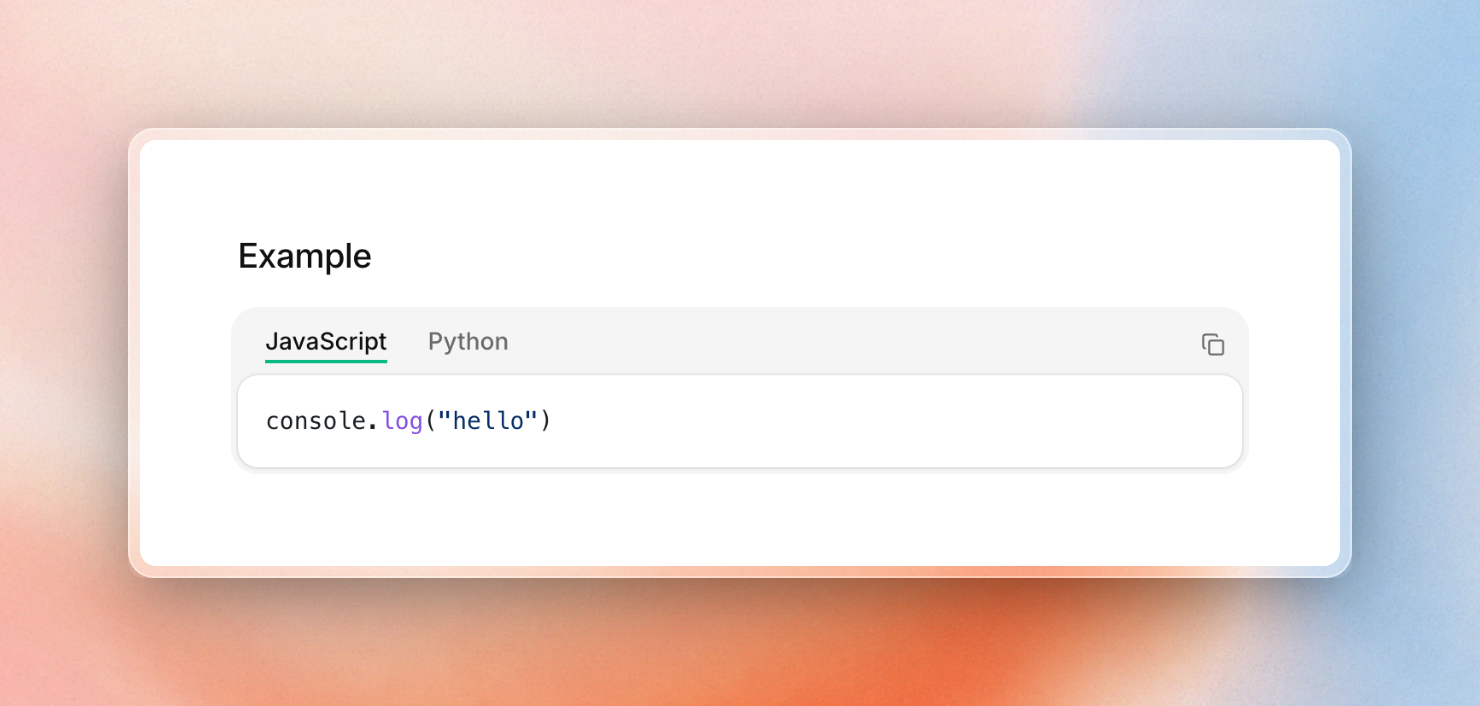 A code group as Docs7 renders it: one tab per language, with a copy button.
Version the docs with each release, and keep a changelog
Versions matter for coding agents too: Context7 library reference includes previousVersions in context7.json for older releases via Git tags, so an agent can request docs matching what a project actually pins. More about this in Versioned library docs for AI coding tools.
Support varies across platforms:
- docs.rs and pkg.go.dev generate reference documentation for each published release without configuration.
- Read the Docs maps Git tags and branches to versions, and creates a
stableversion following your highest release tag. - Docusaurus duplicates your entire docs folder into a frozen version folder every time you run
docusaurus docs:version 1.1.0. - Mintlify and Docs7 parse a
versionslist in thedocs.jsonnavigation to render a version dropdown. - GitBook relies on site variants for version releases, on every plan, including Free.
- Fern Docs offers version switching on the free plan.
Versions are more work to maintain, whichever platform you use: every version is a copy of your docs you have to update when you spot a mistake. Docusaurus even warns against versioning docs that rarely change because it makes builds slower and contributions harder. Creating a new version for every breaking major release, but having one up-to-date set of docs (plus a changelog) for everything in between, reduces the cost.
And, if you don’t have multiple versions, any readers of v2 of your SDK who end up on the v3 docs will copy code that doesn’t compile.
The changelog tells readers what changed and how to upgrade. In a docs.json site, each entry is an <Update> block with a date label and tags that readers can filter by:
<Update label="2026-11-02" tags={["Breaking"]}>
  `getUser` now returns `null` for an unknown id instead of throwing.
  Replace `try`/`catch` around the call with a `null` check.
</Update>
Keep the docs in sync with the code
Docs drift because the code changes in one pull request, and the docs update in another, or never. These four habits keep them together:
- Keep the docs folder in the SDK repository, so one pull request changes the code, the guide and the sample.
- Regenerate the reference in CI and fail the build when the committed file is out of date.
- Build a preview of the docs for every pull request, so reviewers read the changed page instead of a diff.
- Let an agent review docs pull requests and open fixes for what it finds.
Step 2 is two commands. We changed one doc comment in the TypeDoc example above without regenerating, then ran the check:
$ npx typedoc
$ git diff --exit-code docs/reference
-Fetches one user by id.
+Fetches one user by id, or returns null.Git exits with code 1, so the CI job fails until someone commits the new reference.
Previews and review agents depend on the host. Docs7 builds a preview for every pull request on its Free plan, while Mintlify includes preview deployments from Pro. Docs7 also runs two agents. The PR Review Agent checks each docs pull request for broken links and pages agents can't read. The Context7 Agent turns questions that agents asked and your docs could not answer into pull requests. AI agents that keep docs up to date compares these agents with what other platforms offer.
If your SDK wraps a REST API, a spec-first tool can write both the SDKs and the reference from one OpenAPI file. Fern's free SDK plan covers Python and TypeScript for up to 200 endpoints. Its other languages (Java, Go, C#, Ruby, PHP, Swift, Rust, and Kotlin in progress) are on Enterprise, priced per SDK. Hosting API docs from an OpenAPI spec covers the reference side.
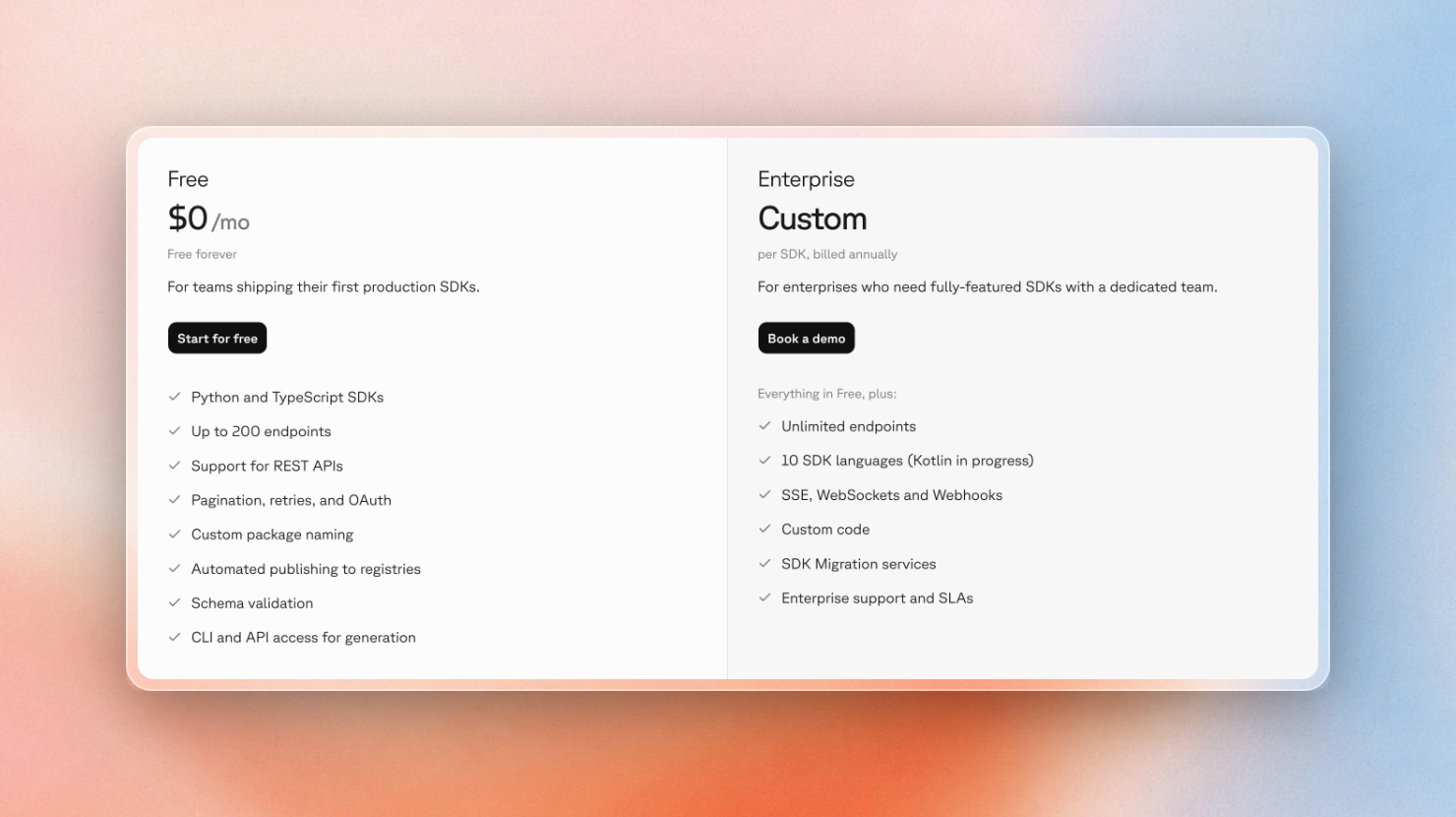 Fern's SDK plans: Python and TypeScript on Free, ten languages on Enterprise.
Make the docs readable by AI coding agents
Your SDK documentation doesn’t need fancy layout and styling to be used by a coding agent. An agent fetches a URL, reads the text, and then moves on. If your documentation contains the following, it will make it convenient for an agent to use:
- An
llms.txtindex that lists out the Markdown URL for each page. - A Markdown version of each page, available either by appending
.mdto the URL or by sending anAccept: text/markdownheader. - A search endpoint that can be queried with a few keywords.
- A library on Context7, which means agents already using the Context7 MCP server can use your docs out of the box.
Upstash's docs run on Docs7 and cover SDKs in both TypeScript and Python. Asking a normal page URL for Markdown returns Markdown:
$ curl -sI -H "Accept: text/markdown" https://upstash.com/docs/redis/sdks/ts/overview | grep -i content-typecontent-type: text/markdown; charset=utf-8The ask endpoint answers a keyword search with pages, headings and snippets as JSON. One query finds the same section in both SDKs:
$ curl -s "https://upstash.com/docs/ask?q=ratelimit%20sliding%20window" | jq -r '.results[:4][] | .href'/docs/redis/sdks/ratelimit-py/algorithms#sliding-window
/docs/redis/sdks/ratelimit-ts/algorithms#sliding-window
/docs/redis/sdks/ratelimit-py/algorithms#fixed-window
/docs/redis/sdks/ratelimit-ts/algorithms#fixed-windowThe Docs7 build is able to generate everything from the website build, so as Docs7 is used with Add to Context7 enabled, the site's Context7 library is also constantly updated when deploying to production. Context7 has handled over 18 million agent requests in the last 30 days across 122,000 indexed libraries.
Some hints help an agent and only clutter the page for a person. Docs7's <Visibility for="agents"> block puts text in the Markdown output and leaves it off the website:
<Visibility for="agents">
When the API returns 409, read the existing resource before retrying.
</Visibility>
Most hosted docs platforms generate llms.txt now, too. See this comparison of llms.txt platforms for which ones do. However, your SDK does not need Docs7 to be on Context7, as anyone can add a public library from its repo or llms.txt.
Where to host SDK docs: platforms compared
The generator writes the reference, but something has to host it next to the guides. Here is how the main hosts compare, with prices from each pricing page on November 2, 2026:
Docs7 and Mintlify prices are per month. GitBook's monthly billing is $79 per site plus $15 per user. Fern, ReadMe and Read the Docs list the plans above.
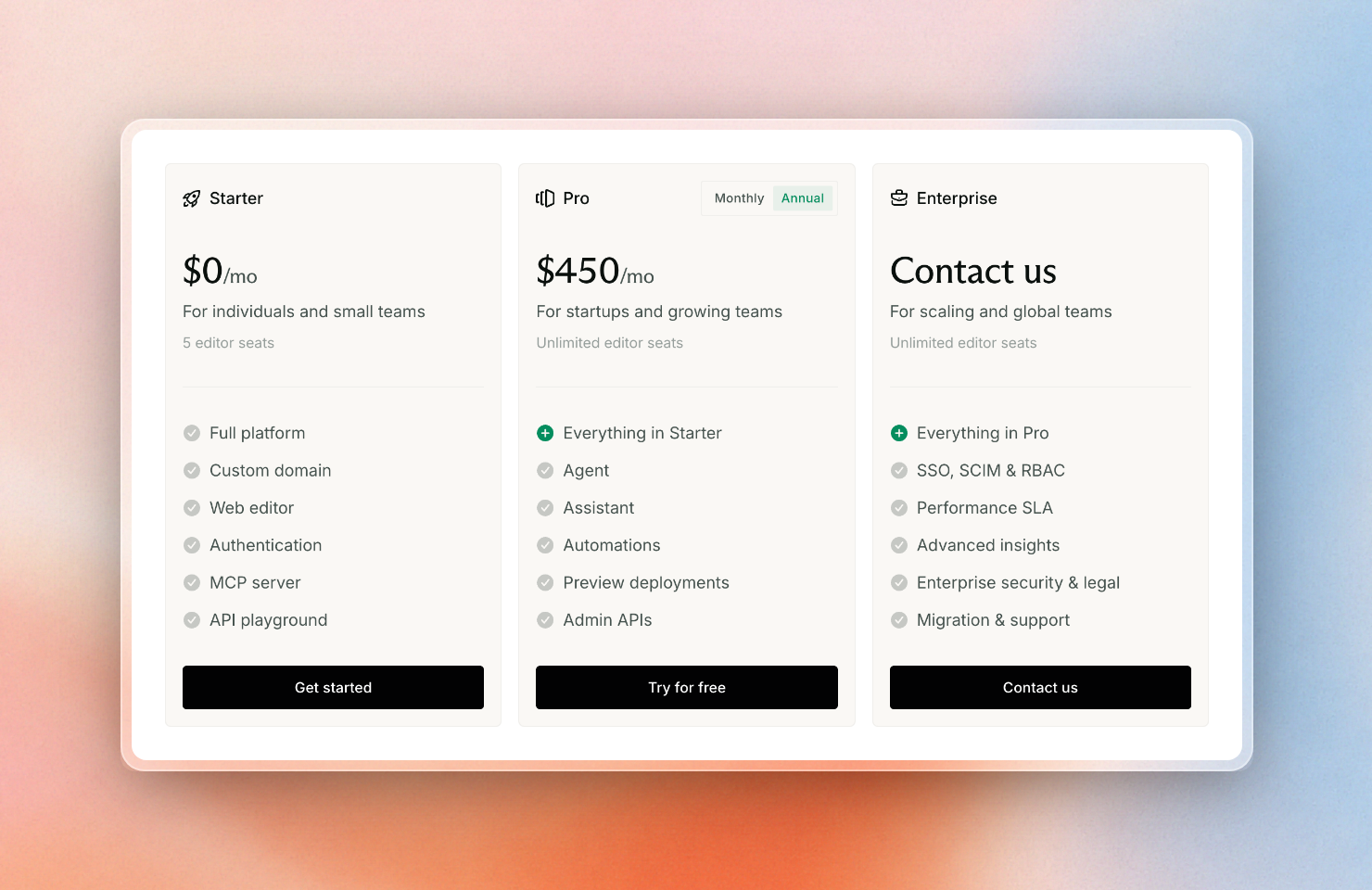 Mintlify plans with annual billing: preview deployments and the assistant start on Pro.
Which one fits depends on your language and on who writes the docs:
- A Python SDK with Sphinx docs: Read the Docs. It builds Sphinx, versions from tags, and is free for open source.
- A Rust or Go SDK: docs.rs or pkg.go.dev for the reference, plus a small guide site on any host.
- A REST API that needs SDKs in many languages: Fern, because it writes the SDKs and the docs from one spec.
- Docs written by people who do not use Git: Mintlify or GitBook, for the web editor.
- An open-source SDK with no hosting budget: Docusaurus, self-hosted.
- Developers write the docs in GitHub, and you want agents to read them: Docs7.
The best Mintlify alternatives and open-source docs platforms guides compare these hosts in more depth.
Where Docs7 fits
Connect your SDK repository and Docs7 builds a preview. If you already have a Mintlify project, you can move it without rewriting MDX.
Docs7 does not make reference docs from code. It is the host. Your generator runs in CI and writes MDX into the docs folder. Docs7 builds that folder with the rest of the docs.json project: guides, code groups, changelog entries, OpenAPI files and versions.
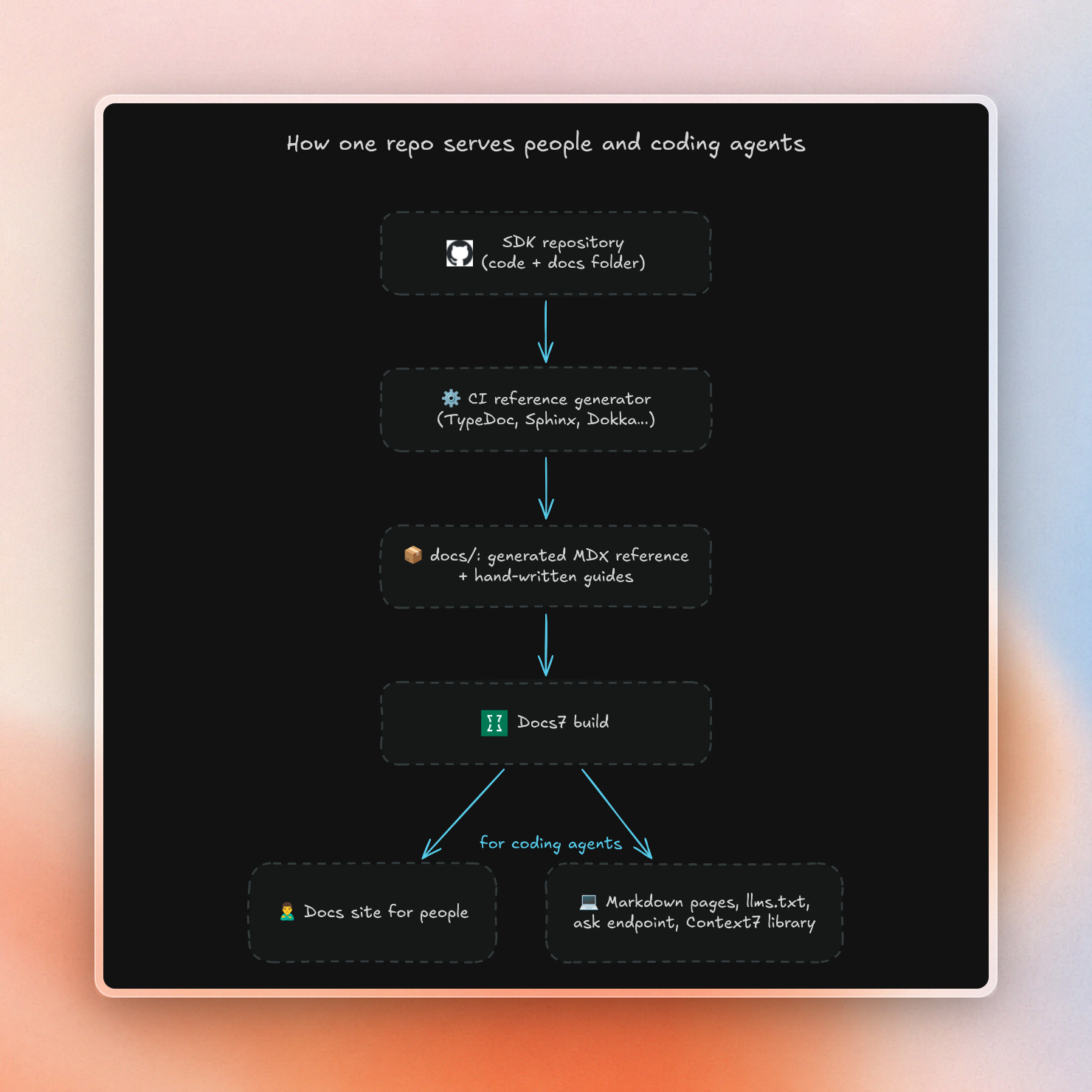
A public SDK fits on the Free plan, which includes:
- Markdown pages,
llms.txt, the ask endpoint and Context7 sync. - A custom domain and a preview deployment for every pull request.
- Analytics on which agents read which pages, with seven days of history.
- Limited use of the AI assistant, the Context7 Agent and PR reviews.
Pro is $200 a month. It adds private repositories, 90 days of analytics and unlimited use of the AI features.
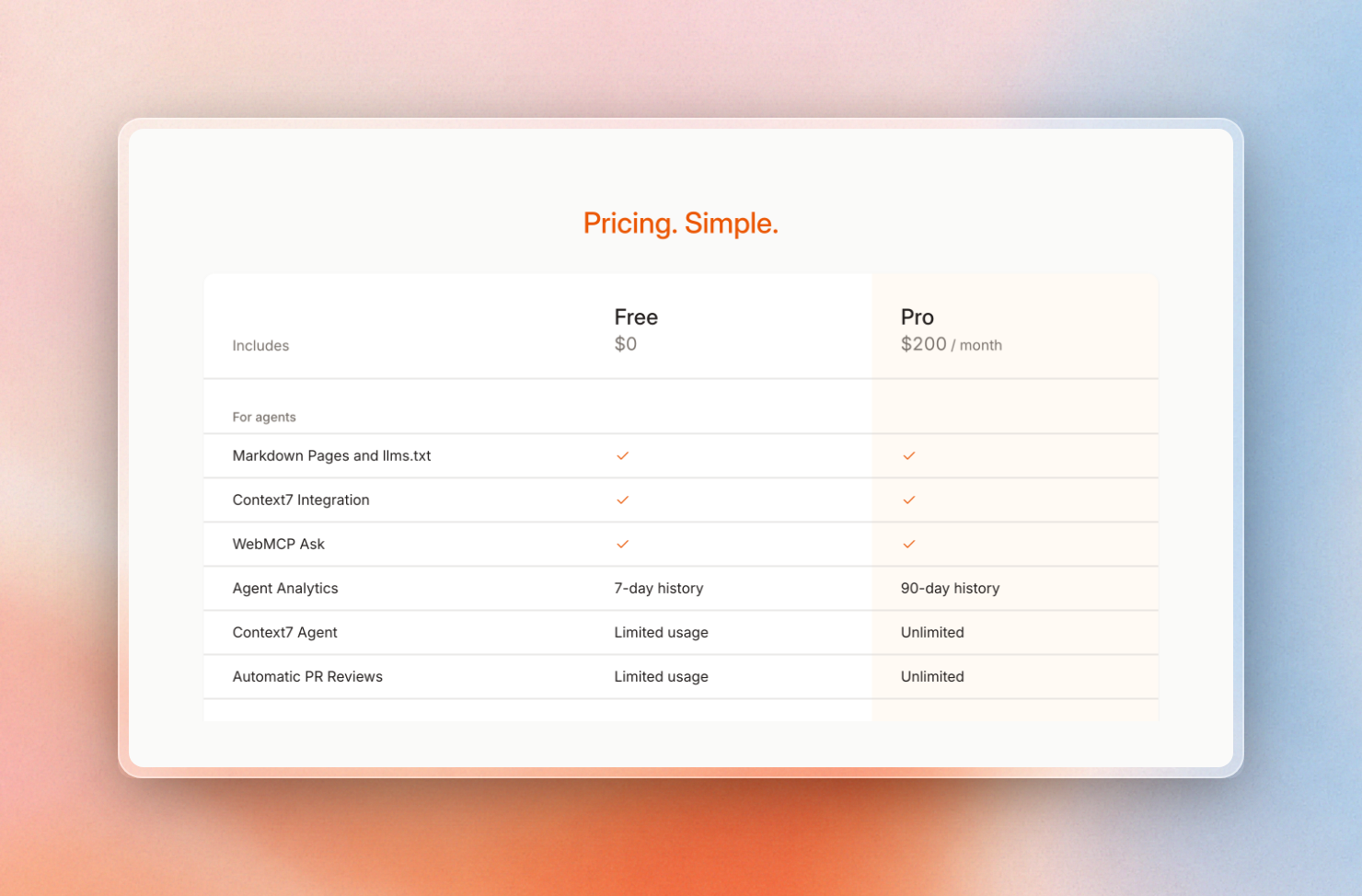 Docs7 plans: the agent features are on both Free and Pro.
Docs7 is the wrong pick if you need a web editor. It connects GitHub repositories only. It also does not write SDKs from an API spec. If you need any of those, use Mintlify, GitBook or Fern instead.