The Docs7 Agent works from your GitHub repository and keeps every proposed change reviewable. Open Docs7, choose a site, then select Agent.
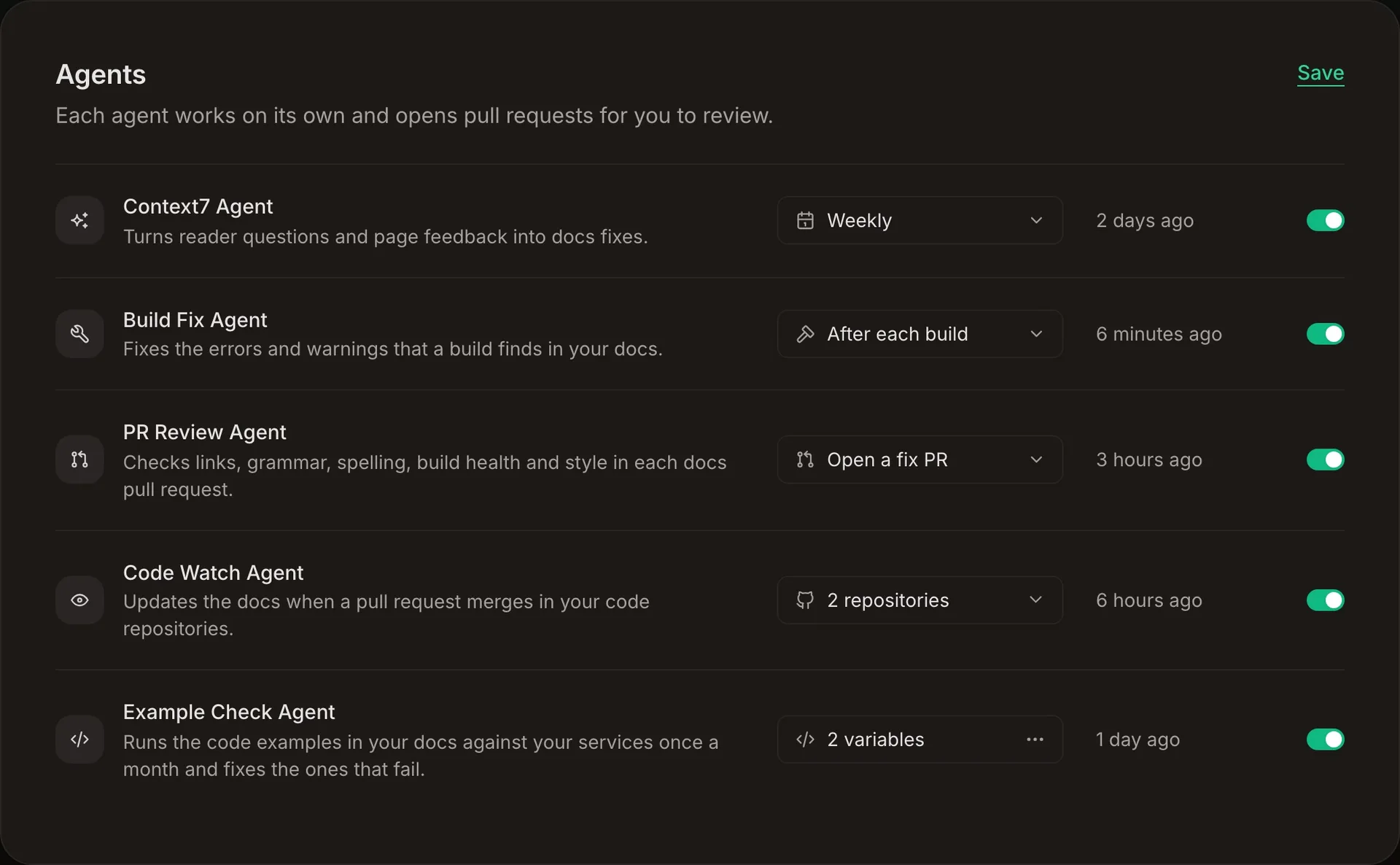
There are five agents:
- Context7 Agent turns the questions that AI agents ask Context7 about your docs into docs fixes.
- Build Fix Agent fixes the errors and warnings that a build finds in your docs.
- PR Review Agent reviews documentation changes in each eligible pull request.
- Code Watch Agent updates the docs when a pull request merges in your code.
- Example Check Agent runs the code examples in your docs against your services and fixes the ones that fail.
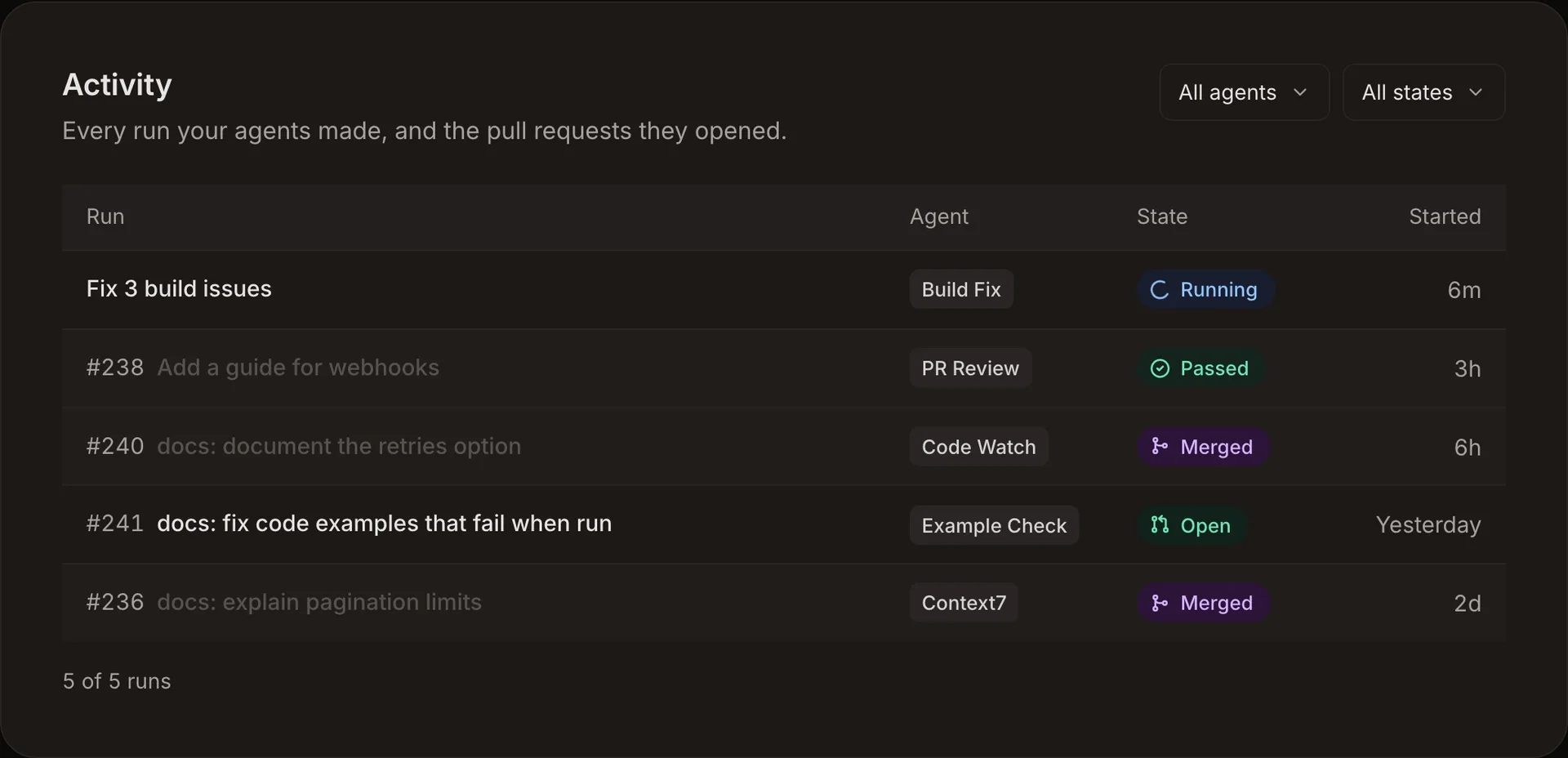
The Agents card holds each agent’s settings, and the Activity card below it lists every run of every agent, newest first. Select a run to open its pull request on GitHub.
The agents work on the Free plan with a monthly allowance for each site. Pro has unlimited use. See Plans & Pricing.
Context7 Agent#
The Context7 Agent works from suggestions. Suggestions come from the questions that AI agents ask Context7 about your docs. When its schedule comes around, the agent picks up the pending suggestions on its own.
A run verifies each suggestion against the repository and edits only the configured docs path. Up to 10 suggestions go into one pull request. A run waits while its last pull request is still open, so unreviewed pull requests do not stack up.
Schedule#
New sites start with the schedule disabled. Turn the agent on and choose Daily or Weekly. Turning it on selects Weekly first. A scheduled run starts only when at least one suggestion is waiting.
Build Fix Agent#
Build issues come from the latest live production build. They cover fixable page errors, broken internal links, unknown components, and source warnings. The Build Fix Agent needs Docs7 hosting, because the issues come from a Docs7 build.
A run fixes up to 20 issues in one pull request. It waits while its last pull request is still open, and it skips the issues its last finished run took, so a closed pull request does not come back after every build.
Schedule#
Choose After each build, Daily, or Weekly. New sites start with it off, and turning it on selects After each build first.
An after-build run starts once a production build finishes. A daily or weekly run starts on that schedule.
PR Review Agent#
The PR Review Agent starts 5 minutes after an eligible pull request preview finishes, so a quick follow-up push replaces the review before it uses a run. It reviews only files inside the configured docs path and posts its findings in the pull request’s Docs7 summary.
New sites start with PR reviews disabled and Comment only selected.
Checks#
Every review runs every check:
- Broken links: broken internal links, dead external links, and links to missing headings in changed docs files.
- Build health issues: new fixable issues introduced by the preview compared with production.
- Grammar and spelling: mistakes in text added or changed by the pull request.
- Docs conventions: changed pages against repository instructions and nearby documentation patterns.
Build health finds issues only on a hosted Docs7 site. The other checks also run for a repository connected only for the agent.
Response modes#
The findings comment is always posted. The response mode controls what happens to fixes:
- Comment only reports findings and does not change files.
- Open a fix PR opens a separate pull request with supported fixes.
- Commit to branch pushes supported fixes to the pull request branch. If the branch refuses the push, Docs7 opens a pull request against it instead.
Docs7 skips pull requests from forks and pull requests that do not change the configured docs path. It also skips commits created by the agent, which prevents review loops.
Do not make Docs7 PR Review a required GitHub check. Fork pull requests do not receive that check.
Code Watch Agent#
The Code Watch Agent keeps your docs in step with your code. When a pull request merges into the default branch of a repository you chose, the agent checks whether readers of your docs need a change. If they do, Docs7 opens one docs pull request that links to the merged pull request. Most merges change nothing that readers see, and then the agent opens nothing.
Choose repositories#
Select Edit, then use the repository list in the Code Watch Agent row to pick up to 50 code repositories from the same GitHub account as your docs. The Docs7 GitHub App must have access to each one. Private repositories need Docs7 Pro. Then turn the agent on.
If your docs are in a folder of the same repository as your code, that repository is already selected.
What the agent checks#
The agent reads the merged change and looks for what readers can notice: added, removed, or renamed functions, methods, commands, options, parameters, defaults, limits, environment variables, configuration keys, and documented behavior. It then searches your docs for each one:
- If the docs already describe the change correctly, it changes nothing.
- If a page is now wrong, or a list of commands, methods, or options is missing the new item, it edits the docs and follows the structure and style of the nearby pages.
The agent edits only the configured docs path. The docs pull request goes through your normal review.
If the merged change is in a package readers install from a registry such as npm or PyPI, the agent documents the published release that first contains it, for example “From 1.40.0”. If no release contains the change yet, the agent makes no change for it, and it does not check the change again when the release ships, so update those docs yourself.
Docs7 does not run the agent for:
- pull requests opened by bots, such as release and dependency updates
- pull requests that change only tests, CI files, lockfiles, changesets, or changelogs
- pull requests that change only the docs, when the docs and code share a repository
- pull requests opened by Docs7 itself
- merges that a person’s docs pull request already covers: a pull request that is open or merged in the last 14 days, changes the docs path, and links the merged pull request, is linked from it, or has the same ticket key (for example
DX-3137) in its title or branch
For a pull request from a fork, the agent uses the merged code and ignores the pull request’s title and description.
When a merge belongs with a docs pull request the agent already opened and that is still open, for example the same commands added to your JavaScript and Python SDKs, the agent adds its change to that pull request instead of opening another one.
The Activity card lists each merged pull request the agent checked, with the docs pull request it opened or No change. Each checked pull request counts as one run in the site’s monthly agent allowance.
Example Check Agent#
The Example Check Agent runs the TypeScript, JavaScript, and Python code examples of your docs against your services once a month. When an example fails because the example is wrong, the agent fixes it, runs it again, and adds the fix to a pull request. It needs Docs7 Pro.
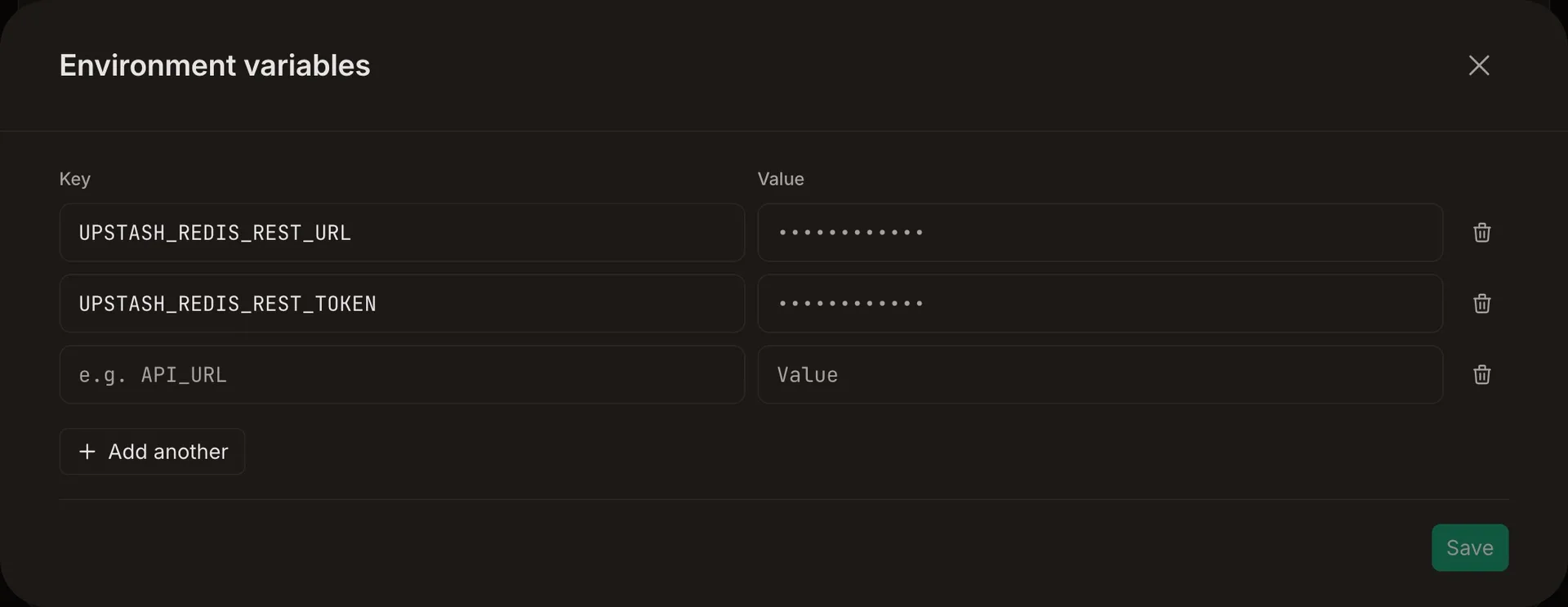
Add variables#
Select Edit, then open the variables in the Example Check Agent row and add the environment variables your code examples read, for example UPSTASH_REDIS_REST_URL and UPSTASH_REDIS_REST_TOKEN. To add many at once, paste the contents of a .env file into any field: each line becomes one variable.
Docs7 encrypts every value and never shows it again. A URL goes into the sandbox where the code runs. Any other value is a secret and never enters the sandbox: Docs7 sends it as Authorization: Bearer <value> only in HTTPS requests to the host of the variable with the same name up to the last _, followed by URL. For example, UPSTASH_REDIS_REST_TOKEN is sent to the host of UPSTASH_REDIS_REST_URL. If you change that URL to another host, enter the secret again. The code in the sandbox reads a placeholder and can reach only package registries and the hosts of your URL variables.
Use test credentials. Code examples write and delete data, for example the keys in a Redis database. The agent deletes what its tests create.
Checks#
Turn the agent on. You can turn it on before you add any variables: examples that need no service are checked as usual, and the others are skipped. The first check starts within a day, then one check runs each month. A check reads every page of the docs path, in batches of about 100 code examples, and counts as one run. A large site can take up to a day.
Each code example ends with one of these results:
- Passed: the example ran and did what the page says, including the documented output and responses.
- Failed: the example threw an error, or its result differs from the page. If the example has a mistake, such as a wrong method name, argument, value, expected output, import, or syntax, the agent fixes it and runs it again. If the page documents the API correctly but the released SDK or the service does not support it yet, the agent removes the example from the page and comments on it in the pull request, so you can restore it after that release.
- Skipped: the example needs a service with no variable, connects over TCP (for example ioredis, node-redis, or redis-py with a
redis://URL), is not a complete program, or is a whole framework app such as a Next.js route.
When examples are skipped because a variable is missing, the variables dialog lists the variables they need and how many examples wait for each. Add them, and Docs7 checks those examples again right away, without waiting for the next month.
All changes of a check go into one pull request. Its description lists every failed example of the check: the ones the agent fixed, the ones it removed, and the ones it could not fix. A check with no change opens no pull request. The next check waits until this pull request is merged or closed. The Activity card shows each check as one row.
Safety and scope#
Agent runs receive read access to the connected repository, and Code Watch runs receive read access to the code repository of the merged pull request as well. Example Check runs receive your variables; secret values stay outside the sandbox. The agent can inspect repository source to verify a documentation change, but trusted Docs7 code publishes the resulting files through GitHub.
Changes are limited to the configured docs path. When the docs path is the repository root, Docs7 still blocks common application paths, package manifests, lockfiles, .github, and .git from agent changes.